
To remove your company accounts from your personal device here some quick guides For Outlook, and OneDrive
Outlook
- Open the Outlook Preferences window either from the top menu or by pressing cmd + ,
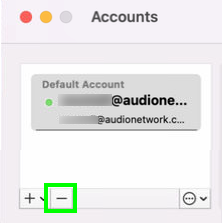
- Click into the Accounts section
- Locate and select your Audio Network Profile(s)
- Click on the - (minus) symbol in the bottom left hand corner to remove this profile.
- Confirm Sign Out of the account
- Close the preferences window.
OneDrive
- Click into the OneDrive app in the tool bar at the top of the screen,
- In the settings cog select select preferences
- Click into the Account Tab,
- Locate the Audio Network account and select Unlink this Mac
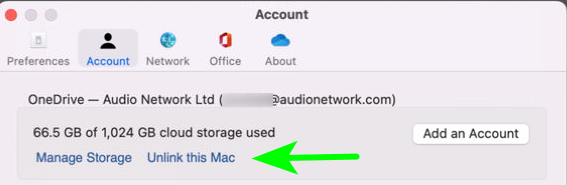
- Click on Unlink Account in the pop up to complete.
Comments
0 comments
Article is closed for comments.