
To export your saved Passwords in Edge:
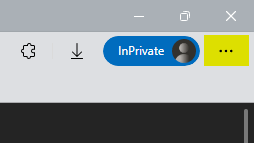
- Click on the three dots in the upper right corner of the browser and then click Settings
- Click on Passwords
- Click on the three dots next to Saved Passwords and click Export Passwords.
- A warning will appear; click the button Export Passwords.
- Provide your Windows credentials and then a save dialog will appear.
- Name the file appropriately and then save the file to a location in your OneDrive.
Comments
0 comments
Article is closed for comments.